Full Text Search Options Full Text Search Options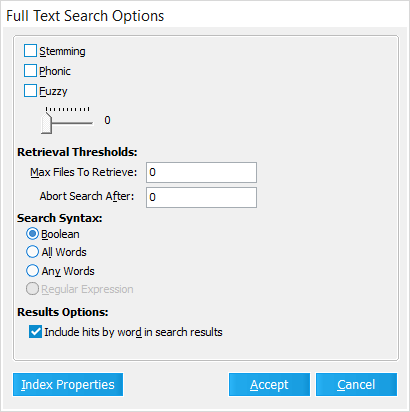
This window provides settings that determine how LAW searches through the full-text index of the active Case Directory when performing text-based queries.
•Stemming - All variants of each listed keyword are returned in the search results. For example, the search term "index" will also return "indexing", "indexed", "indexes", etc. •Phonic - Keywords sounding similar to those listed are also returned in the search results. For example, the search term "pear" will also return "pair", "pare", etc. •Fuzzy - Keywords with similar spelling to those listed are also returned in the search results. You can determine the margin of similarity with the slider, on a 1-10 scale. •Retrieval Thresholds - These options limit how long the search is performed for: oMax Files to Retrieve - Matching records are returned until this value is reached. Leave at 0 for no limit. oAbort Search After - Records are searched for matches until this value is met. Leave at 0 for no limit. •Search Syntax - The following options (select one) determine how search term text is interpreted: oBoolean - Treat any Join connectors (AND/OR) exactly as they appear. All other text is treated as exact keywords or strings that are separated by these connectors. oAll Words - Same as Boolean, but uses AND in place of all Join connectors. oAny Words - Same as Boolean, but uses OR in place of all Join connectors. oRegular Expression - Turns on regular expression (regex) mode, treating all text as search strings that target algorithmic patterns rather than exact keywords. •Results Options oInclude hits by word in search results - A temporary "ft_HitsByWord" field will be included for each record returned by the query. This field displays which search terms were located, along with their frequency within. •Index Properties - Opens the Full Text Index Properties window. |