You can use the Log Viewer to review errors and warnings that may occur during these operations:
•Importing
•Exporting
•Batch Processing
•Reorganizing
•Scanning
•Deduplication
•Page Count Extraction
•Turbo Imager
 To Start the Log Viewer
You can start the Log Viewer in either of the following ways: •After processing the operation, if errors or warning conditions occurred, you are prompted to view the Log Viewer. You may choose to open the viewer at this time. Or 1.From the main window, on the Tools menu, click Log Viewer. The Open Error Log dialog box appears.
2.Do one of the following: •In the All Logs tab, select a log to open. •Click a different tab and then select a log. |
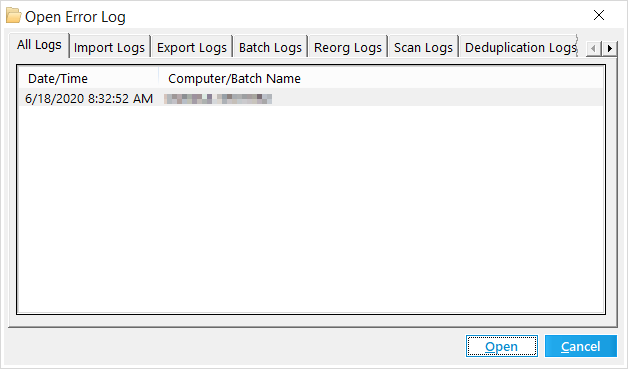
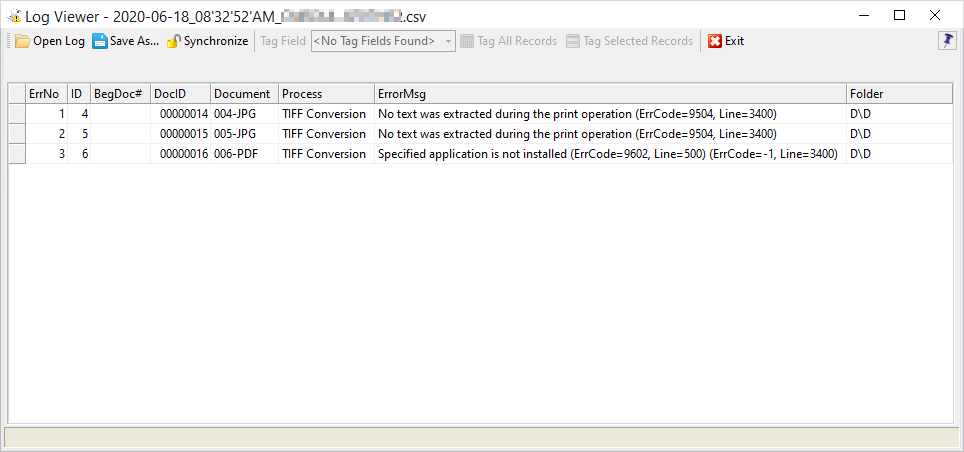
3.Click Open. The Log Viewer dialog box appears. The table lists fields is log files and the title bar shows the filename of the error log. Error logs for most processes are stored in <case root>\$Logs in *.csv format. |
 Tagging Records for Review
You can apply a Tag (Boolean) value to records shown in the Log Viewer. This action can be useful for creating custom reports, reviews, and selecting items for further processing, etc. 1.Create a Tag (Boolean) field. For more information on creating tag fields, see Creating Tag Fields. 2.On the Tools menu, click Log Viewer. 3.Select the tag field you created in the previous step. 4.Click the Tag All Records button. 5.Select the desired records and then click the Tag Selected Records button. •Tagged records will appear checked in the grid displays and set to <Yes> in the Index display. •Tag values cannot be toggled using this feature.
|